Evaluation Definitions
Return
to Demo/Tutorial Contents Page
The Evaluation Definition setup section provides a great deal of flexibility and control in developing evaluation tools. Each evaluation definition includes questions or items to which evaluators respond, lists of valid responses for each question, groupings of questions called sections, lookup tables with standardized score values, rules for scoring, and versions that make it possible to have many variations on the same basic evaluation tool.
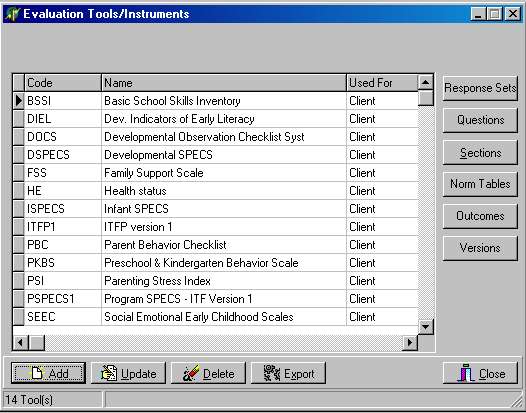
The Evaluation Tools/Instruments dialog is the control center for working with Evaluation Definitions. The screen below shows the evaluation definition dialog with a list of some of the instruments being used by R/Client for Children users. The buttons on the right side of the dialog provide access to the detailed setup information within each evaluation instrument. The buttons on the bottom of the dialog (Add/Update/Delete/Export) are used to manage the tool as a whole.
Dialog Options:
- The Add/Update/Delete buttons are used to create, modify, and remove unneeded evaluations. Of course, the software prevents deleting an evaluation tool that is actually in use.
- The Export option is used to create an evaluation definition file that can be sent to another copy of R/Client for Children.
- Evaluation Information. Contains information about the tool.
- Response Sets. Determines ways evaluators can respond to questions.
- Questions. Defines what is being asked.
- Sections. Groups questions for presentation during data entry and reporting.
- Norm Tables. Defines lookup values, standard scores, and percentiles.
- Outcomes. Spells out the scoring mechanisms.
- Versions. Organizes response sets, questions/sections, and outcomes into usable tools.
Modified: 11/16/2001