Evaluation Tool Information
Return
to Demo/Tutorial Contents Page
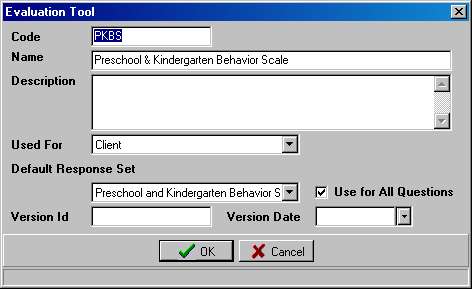
Each Evaluation Tool starts with basic information about the tool, such as its name, a brief description, for whom the evaluation is designed and the current version.
The Evaluation Tool dialog provides a place to record general information about the instrument.
|
Evaluation
Tool Fields
|
|
|
Field
Name
|
Description
|
| Code | Short-hand unique identifier for the tool that appears on data entry screens and in drop-down lists. |
| Name | Complete name of the tool. |
| Description | Narrative discription of the tool. |
| Used For |
Specifies whether the tool is used to evaluate, Clients, Staff, Providers or Projects. |
| Default Response Set | Used to specify the most commonly used set of valid responses (e.g. Always, Sometimes, Never). |
| Use for All Questions | Determines if all questions in the tool share one set of valid responses. |
| Version Id | Used to uniquely identify a version of a tool (e.g. 1.3). This field is used to determine if remote machines or laptops have the most current version of an evaluation tool. |
| Version Date | Date this version of the tool was released. This field is used to determine if remote machines or laptops have the most current version of an evaluation tool. |
Return to Evaluation Definition Page
Modified: 11/08/2001