Evaluation Recording
Return
to Demo/Tutorial Contents Page
Evaluations can be recorded for
- Clients,
- Staff,
- Providers, or
- Projects.
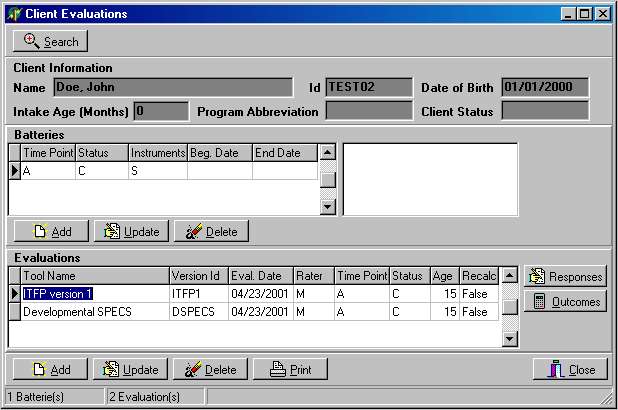
Evaluations are grouped into batteries evaluations that were done during the same time period and contain the evaluator's responses and system computed outcome scores. An example of the Evaluations dialog for clients is displayed below. It contains one battery and two evaluation administrations. The Staff, Provider, and Project dialogs are basically the same except that staff, provider, or project information is displayed at the top of the dialog.
Dialog Options:
- The Search option is used to find a different client, provider, etc. without having to leave the Evaluation dialog
- The Responses option is used to enter/update or view the evaluator's responses.
- The Outcomes option is used to review or recompute outcome scores.
Modified: 11/12/2001