Evaluation Recording - Response Information
Return
to Demo/Tutorial Contents Page
Responses are the coded multiple-choice and narrative information answers and narrative comments about the responses provided by the evaluator.
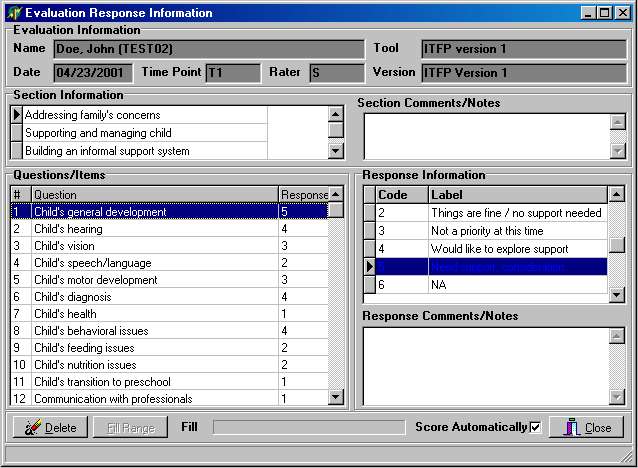
The Response Information dialog is used to record the detailed responses to each question in an evaluation. The Response Information dialog reconfigures itself to include or not include the Section Information and Comments/Notes sections based upon options in the Version Information dialog.
|
Response
Fields
|
|
|
Field
Name
|
Description
|
| Section Information | Displays information from the Section Information setup. Selecting a section causes the questions for that section to be displayed in the Questions/Items portion of the dialog. |
| Section Comments/Notes | Provides a place to record narrative comments that relate to a group of questions. Does not appear unless enabled in the Version Definition. |
| Questions/Items | Actual question to which the evaluator responds. |
| Response Information | Coded or narrative responses to each question. |
| Response Comments/Notes | Provides a place to record narrative comments that relate to a single question. Does not appear unless enabled in the Version Definition. |
Dialog Options:
- The Score Automatically check box is used to disable automatic scoring in special data entry situations.
Modified: 11/08/2001