Evaluation Recording - Evaluation Information
Return
to Demo/Tutorial Contents Page
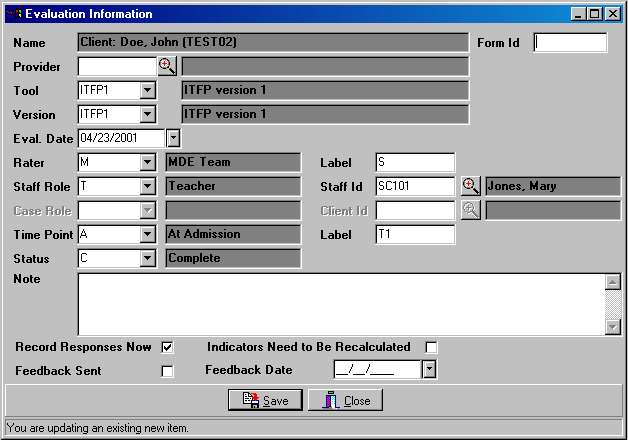
Evaluation Information includes tool/version information, who did the evaluation, and when it was done. Additional fields support feedback tracking and recomputing scores if necessary.
The Evaluation Information dialog is used to record information each time an evaluation is performed.
|
Evaluation
Fields
|
|
|
Field
Name
|
Description
|
| Form Id | Can be used to record tracking numbers from paper forms. |
| Provider | Documents the agency or department responsible for the evaluation. |
| Tool | Identifies the Evaluation Tool. |
| Version | Identifies a specific version of a tool. |
| Eval. Date | Documents the date of the evaluation. |
| Rater | Identifes the category of rater(s). |
| Rater Label | User-Defined label for the rater. |
| Staff Role | Identifies staff role (e.g. therapist, coordinator, etc.) |
| Staff | Identifies a specific staff person. |
| Case Role | Identifies a family member's role (e.g. parent, grandparent, etc.). |
| Client Id | Identifies a specific family member or the client for self-evaluations. |
| Time Point | Coded Time Point identifying the rough service phase (e.g. At Admission, While Open, At Discharge, etc.) |
| Time Point Label | User-Defined label for time point. |
| Status | User-Defined completion status (e.g. Completed, Incomplete). |
| Note | Narrative about the evaluation. |
| Record Responses Now | Check box determining if the response dialog should appear automatically after adding a new Evaluation - defaults to yes. |
| Indicators Need to be... | Check box used to flag an evaluation to be rescores. |
| Feedback Sent | Check box showing if a feedback letter has been generated for the evaluation. |
| Feedback Date | Date the most recent feedback letter was generated. |
Modified: 11/08/2001