Evaluation Definition - Outcome/Indicator Information
Return
to Demo/Tutorial Contents Page
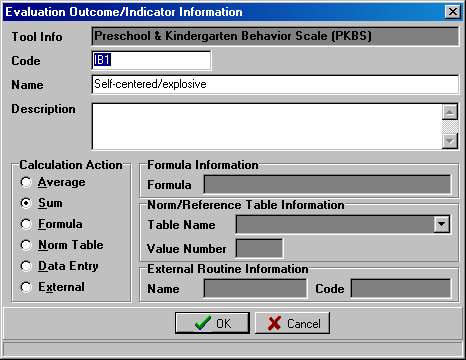
Outcome/Indicator Information specifies the details for computing a single score. Different Calculation actions have additional fields which flesh out the outcome (e.g. which Norm/Reference Table and Column).
The Outcome/Indicator Information dialog provides the place to enter the Outcome Scoring details.
|
Section
Fields
|
|
|
Field
Name
|
Description
|
| Tool Info | Shows the name and code of the tool to which this Outcome belongs. |
| Code | Short-hand unique identifier that appears on data entry screens and in drop-down lists. |
| Name | Brief Description used in pop-up menus. |
| Description | Narrative description of the item. |
| Calculation Action |
Specifies the type of calculation to perform. |
|
Adds response values for selected questions and divides by the number of questions. |
|
Adds response values for selected questions. |
|
Performs simple math operations (+, -, *, /) against another Outcome Score. Formulas can be used to weight scores. |
|
Performs a look-up into a Norm Table. |
|
Provides a way to enter a score that was computed using a non-computerized method. |
|
Provides a way to link to an external, customized calculation routine that can not be described using the other Calculation Actions. |
Return to Evaluation Definition Page
Modified: 11/08/2001